Tech Gadgets
A Unique Guide to Smarter Technology for Modern Life
Explore smartphones, laptops, smart-home devices, wearables, wireless audio, gaming gear, travel accessories, and connected technology for everyday life in the USA.
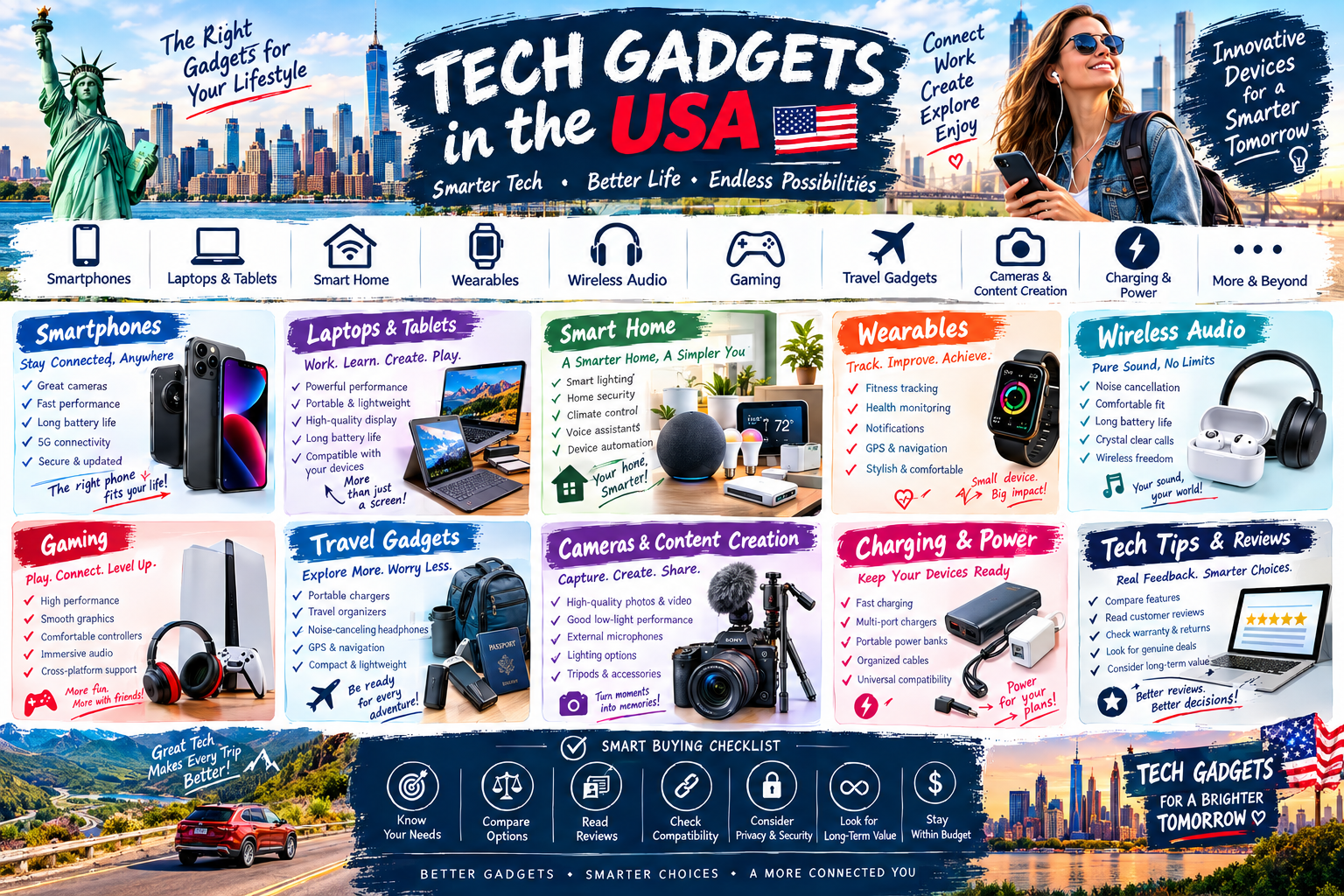
Tech gadgets are no longer limited to computers and smartphones. Modern technology can help people work, communicate, learn, travel, exercise, create content, manage their homes, and enjoy entertainment.
In the USA, consumers have access to an enormous range of electronics and connected devices. With so many options available, choosing the right gadget can be challenging.
The smartest approach is not to buy the device with the most impressive specifications. Instead, focus on what problem the gadget solves, how often you will use it, how well it fits your existing technology, and whether it provides lasting value.
1. Start With the Problem You Want to Solve
Before buying a gadget, identify the reason you want it.
Ask yourself:
What do I want this device to help me accomplish?
How frequently will I use it?
Where will I use it?
Does it work with my existing devices?
Which features do I actually need?
What is my realistic budget?
A gadget becomes more valuable when it solves a genuine everyday problem.
2. Smartphones and Mobile Technology
Smartphones have become central to communication, entertainment, navigation, photography, shopping, and productivity.
When choosing a smartphone, consider:
Performance
Display preferences
Storage needs
Camera capabilities
Battery requirements
Connectivity
Operating-system compatibility
Software support
Security features
Instead of automatically choosing the newest model, think about how you actually use your phone.
Someone who mainly communicates, browses the internet, and takes occasional photos may have very different requirements from a professional content creator or mobile gamer.
3. Laptops and Tablets
Laptops and tablets serve a wide variety of purposes, including education, remote work, entertainment, creative projects, and everyday browsing.
Before purchasing one, consider your primary workload.
For Students
Portability, battery life, comfortable everyday use, and affordability may be important.
For Professionals
Productivity, multitasking, connectivity, reliability, and compatibility with work software may matter more.
For Creators
Display quality, performance, storage, connectivity, and compatibility with creative applications can become major considerations.
The best device is the one that comfortably handles your actual workload.
4. Smart-Home Gadgets
Smart-home technology can make everyday routines more convenient.
Depending on the setup, smart gadgets can support:
Home entertainment
Lighting
Climate management
Security
Energy awareness
Automation
Voice control
Before adding connected devices, consider whether they work with the smart-home ecosystem you already use.
A simple, compatible setup is often easier to manage than a collection of unrelated gadgets.
5. Wireless Audio Technology
Wireless headphones, earbuds, and speakers have become popular for entertainment, communication, travel, exercise, and work.
When evaluating wireless audio products, consider:
Comfort
Intended environment
Connectivity
Controls
Battery requirements
Microphone performance
Portability
Compatibility
Comfort can be just as important as technical specifications, especially for products worn for extended periods.
6. Wearable Technology
Wearables can combine technology with everyday activities.
Smartwatches and fitness-focused devices may support features related to communication, activity tracking, notifications, navigation, or personal organization.
Before choosing a wearable, consider:
Compatibility with your smartphone
Comfort
Display preferences
Battery requirements
Useful functions
Data and privacy considerations
Do not choose a wearable simply because it has the largest feature list. Focus on the functions you will actually use.
7. Gaming Gadgets
Gaming technology includes consoles, computers, controllers, displays, headsets, keyboards, mice, and other accessories.
Gamers should consider their preferred games and platform before purchasing additional equipment.
Important factors can include:
Platform compatibility
Performance
Comfort
Input preferences
Display requirements
Connectivity
Available space
A carefully selected accessory can improve the gaming experience more than purchasing several unnecessary gadgets.
8. Technology for Remote Work
Remote and hybrid work have increased the importance of practical home-office technology.
Useful equipment may include:
Computers
External displays
Webcams
Microphones
Headsets
Keyboards and mice
Charging equipment
Networking devices
The goal should be to create a workspace that is comfortable, reliable, and easy to use.
Instead of filling your desk with technology, identify the equipment that removes the biggest obstacles from your workflow.
9. Travel Gadgets
Technology can make travel more convenient.
Travelers may benefit from gadgets related to:
Charging
Navigation
Communication
Photography
Entertainment
Organization
Portability is particularly important. A travel gadget should ideally solve a genuine problem without adding unnecessary weight or complexity to your luggage.
10. Cameras and Content-Creation Equipment
Creators have access to a broad selection of cameras, microphones, lighting equipment, tripods, storage devices, and other accessories.
The right setup depends on the type of content being produced.
For example, a person creating casual travel videos may need a very different setup from someone producing professional studio content.
Before buying equipment, consider:
What type of content you create
Where you record
How portable the equipment needs to be
Storage requirements
Audio needs
Editing workflow
Existing equipment compatibility
11. Chargers and Power Accessories
Charging accessories may appear simple, but they are important parts of a modern technology setup.
When purchasing charging equipment, check compatibility with your devices and understand the requirements of the products you already own.
For travel, organization and portability can also be important.
A well-planned charging setup can reduce cable clutter and make it easier to keep essential devices powered.
12. Privacy and Digital Security
Convenience should not come at the expense of privacy.
Connected gadgets may interact with accounts, networks, applications, or personal information. Before purchasing a smart or connected product, consider:
Account security
Privacy settings
Software support
Data collection practices
Network security
Device permissions
Use strong passwords, keep software updated, and review privacy settings regularly.
13. Compatibility Matters
One of the most common technology-buying mistakes is overlooking compatibility.
Before purchasing a gadget, check whether it works with:
Your smartphone
Computer
Operating system
Existing accessories
Smart-home ecosystem
Network
Other equipment
A technically impressive product can still be a poor purchase if it does not fit your current setup.
14. Think About Long-Term Value
Technology changes quickly, but that does not mean every new release is worth buying.
Consider:
How long you expect to use the product
Software support
Repairability
Replacement costs
Accessory availability
Compatibility with future needs
Everyday usefulness
A product that remains useful for years can provide better value than one purchased only because it is currently popular.
15. Use Reviews as a Research Tool
Reviews can help you understand how a gadget performs outside a manufacturer's description.
Look for recurring feedback about:
Reliability
Ease of use
Setup
Comfort
Battery experience
Connectivity
Durability
Common problems
Do not rely on a single review. Look for patterns across multiple sources and consider whether reported strengths or weaknesses matter for your specific use.
16. Choose Gadgets Based on Your Lifestyle
For Students
Focus on portability, productivity, communication, entertainment, and affordability.
For Professionals
Look for reliable tools that improve productivity and communication.
For Families
Prioritize simplicity, compatibility, durability, and practical shared-use features.
For Travelers
Choose compact, portable technology that solves genuine travel problems.
For Fitness Enthusiasts
Consider technology that supports activity tracking, workouts, organization, or entertainment.
For Content Creators
Build a setup around the type of content you produce rather than buying equipment simply because it is popular.
17. Common Tech-Gadget Buying Mistakes
Avoid these common mistakes:
Buying the newest gadget without a real need
Choosing specifications you will never use
Ignoring compatibility
Forgetting software support
Overlooking privacy considerations
Buying too many accessories
Focusing only on appearance
Trusting a single review
Ignoring long-term costs
Purchasing because of hype or social-media trends
Smart technology shopping starts with understanding your own requirements.
18. A Smart Tech Shopping Checklist
Before purchasing a gadget, ask:
What problem will this solve?
Will I use it regularly?
Does it work with my existing devices?
Are the important features suitable for me?
Did I compare alternatives?
Did I research reviews?
Did I consider privacy and security?
Is software support adequate for my needs?
Did I consider accessories and additional costs?
Does the price fit my budget?
Will the gadget provide long-term value?
Final Thoughts
Tech gadgets can make modern life more connected, productive, entertaining, and convenient. However, smarter technology use begins with smarter purchasing decisions.
Whether you are choosing a smartphone, laptop, wearable, smart-home device, gaming accessory, travel gadget, or content-creation tool, focus on real needs, compatibility, useful features, quality, privacy, and long-term value.
The best gadget is not necessarily the newest or most expensive—it is the technology that fits naturally into your life and genuinely makes something better.
🛒 View Product Details: indoor dryer vent kit
🛒 View Product Details: flying orb ball
🛒 View Product Details: weed eater head
As an Amazon Associate we earn from qualifying purchases made through these links, at no extra cost to you.
Advertisement
No comments yet. Be the first to share your thoughts!